Photon Memescope: What Every Filter Means (2026)
Table of Contents
- What Is a Memescope?
- What Does Memescope Actually Do?
- What Does the Default Dashboard Ship With?
- What Does Each Filter Actually Screen For?
- Top-10 holder percentage
- Developer holding percentage
- Bonding curve progress
- Is Holder Count Worth Filtering On?
- Liquidity, volume, and market cap
- Can Buy and Sell Activity Be Faked?
- Socials presence
- Filter reference
- Which Filter Setup Should You Start With?
- Conservative
- Momentum
- Early entry
- What Does Memescope Screen For That Rivals Do Not?
- What Does the Quick-Buy Button Really Cost?
- Which Preset Does a Quick Buy Use?
- What Can Memescope Not Do?
- The honest bottom line
What Is a Memescope?
A memescope is a live screener for tokens that launched minutes ago. It sits over a launchpad's feed and filters it: you set the conditions a token has to meet, and everything that fails them never reaches your screen. The usual controls are holder concentration, how much the developer still holds, whether socials are attached, how far a bonding curve has progressed, plus liquidity, volume and market cap. The term is written both ways, memescope and meme scope, and means the same thing either way.
It is not a chart and it is not a wallet tracker. A chart shows one token's history, which at this age barely exists. A wallet tracker follows people. A memescope is for the moment before either is any use: hundreds of launches an hour, no price history, no reputation, and one question worth answering, which is whether a given token deserves a second look at all.
Photon's implementation of that idea is called Memescope, and it is the one this guide documents.
Most people open a Solana terminal and stare at a firehose. Hundreds of tokens launch every hour, the list refreshes faster than you can read it, and the natural response is to click whatever is moving. That is how accounts die.
Memescope is Photon's answer to that problem, and it is the single strongest reason to still choose Photon in 2026. Photon's own documentation describes it as a customizable trading dashboard built "to give our traders even more flexibility in creating a fully-customized feed of all the metrics that they care about when deciding which tokens to buy into." It pulls tokens from  Pump.fun and Moonshot
  , and it lets you decide what reaches your eyes.
The buttons are easy enough to find on your own. Knowing what each filter is telling you is the harder part, and that is what the rest of this covers.
A filter set does not find winners. It removes the tokens you already know you would regret buying, which leaves you with a smaller pool and more attention per candidate. That is the entire benefit, and it is worth having.
What Does Memescope Actually Do?
Memescope is a feed builder. You define the conditions a token must satisfy, and tokens that fail those conditions never appear. The documented controls cover top-10 holder percentage, socials presence, bonding curve progress, holder count, developer holding percentage, liquidity, volume, market cap, and buy and sell activity.
The feed itself is live, with a hover-to-pause behavior so a row stops sliding out from under your cursor, and each row carries a quick-buy button that fires an order without leaving the feed.
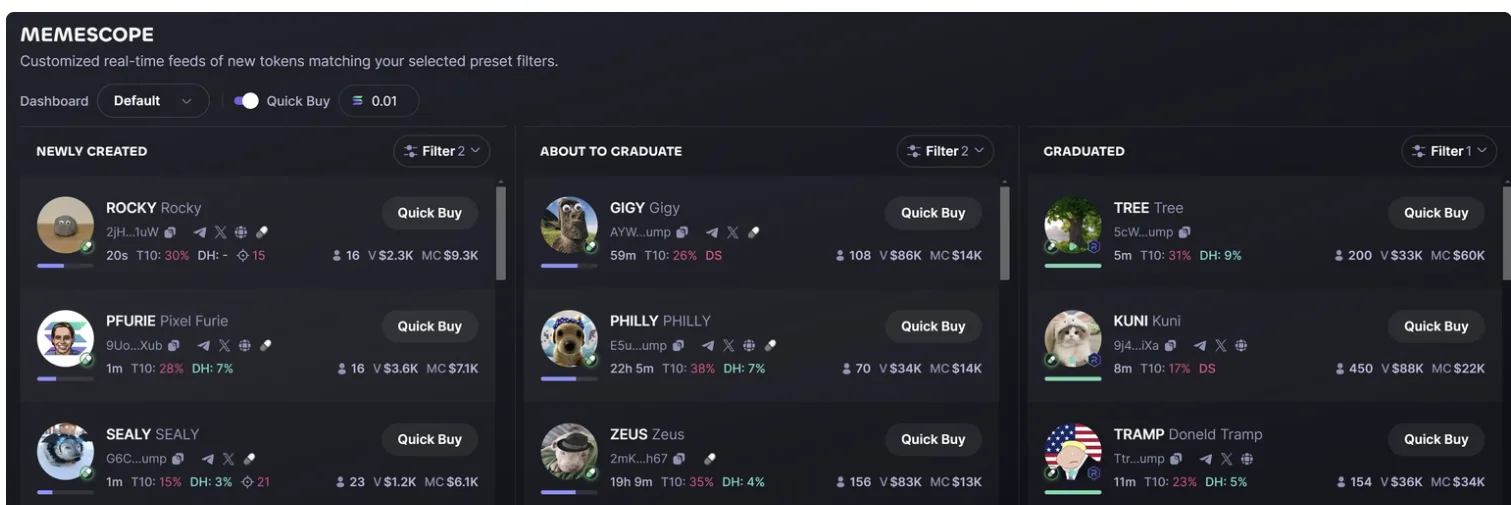
Three columns by default, each filtered separately: Newly Created, About to Graduate, Graduated. Read the per-row shorthand before you touch anything, because that is where the decisions get made. T10 is the top-10 holder share and DH is the developer's holding, both explained below. Note the Quick Buy toggle sitting on 0.01 SOL in the header. That is the control that costs people money, and it gets its own section below.
That last one costs people the most money. It gets its own section further down.
Memescope covers  Solana launchpad tokens specifically. If you are looking at established pairs with real depth, the markets section and Photon's token pages are the better surface. Memescope is for the part of the market where a token is minutes old and nobody knows anything yet.
What Does the Default Dashboard Ship With?
Photon's documentation lists what Memescope can filter on and publishes none of the settings it arrives with. The figures below were read off the running interface instead, from the screenshot above, in one session on 6 August 2026. Photon ships no version number anywhere in the product, so the read date is the only anchor available and it is the one to check this section against.
Three of these are properties of the interface and should still be true when you open it:
- The dashboard selector opens on a preset named Default. That is what a new account lands on before it configures anything.
- Quick Buy sits in the header, toggled on, pre-filled at 0.01 SOL. One click from a live order, at the same amount on every row in every column, until you change it.
- The Default dashboard is not empty. It arrives carrying two filters on Newly Created, two on About to Graduate and one on Graduated, so anything you set is layered on a screen that is already excluding tokens. Nothing in the interface tells you what those five are.
- Every row shows the same six values: age,
T10top-10 holder share,DHdeveloper holding, holder count,Vvolume andMCmarket cap. Bonding curve progress is the bar under the avatar, not a figure. - The columns are not age buckets, which is the reading almost everyone applies to them. In that same read, About to Graduate held tokens 59 minutes and 22 hours old while Graduated held tokens 5, 8 and 11 minutes old. The column tells you where a token sits on its curve and says nothing about how long it has existed.
The rest moves with the market. It is printed to show the scale each field operates at across the three columns, not as thresholds to copy, and the ranges come from nine rows in one read rather than any sample worth calling representative.
| Field, read 6 Aug 2026 | Newly Created | About to Graduate | Graduated |
|---|---|---|---|
| Age | 20s to 1m | 59m to 22h 5m | 5m to 11m |
| T10 holder share | 15% to 30% | 26% to 38% | 17% to 31% |
| Developer holding | none shown to 7% | 4% to 7% | 5% to 9% |
| Holders | 16 to 23 | 70 to 156 | 154 to 450 |
| Volume | $1.2K to $3.6K | $34K to $86K | $33K to $88K |
| Market cap | $6.1K to $9.3K | $13K to $14K | $22K to $60K |
The step between columns is the part worth keeping. Volume rises by roughly an order of magnitude from Newly Created to About to Graduate and then stops rising, while market cap keeps climbing after graduation. Top-10 concentration barely moves across all three, which is the concrete version of the warning further down: graduating a token does not distribute it.
Two things this section deliberately does not give you. Two rows showed DS where a developer-holding percentage would sit, and Photon's documentation does not define that marker, so this page will not guess at it. And the numeric bounds each filter input accepts were not read, because that needs the filter panel open rather than the feed. Both are gaps in this page, not settings Photon has hidden. The same read-it-and-date-it standard is set out on our methodology page.
What Does Each Filter Actually Screen For?
Top-10 holder percentage
This is the percentage of circulating supply held by the ten largest wallets. It is a concentration measure, and what it tells you is how few decisions it takes to destroy the price.
At 60 percent or higher, ten wallets can hit the exit and there is no bid deep enough to absorb them. You are not trading a market, you are trading against a small committee whose incentives you cannot see. At 15 to 25 percent on a token with a few hundred holders, supply is more distributed and a single seller matters less.
The trap is reading a low number as safety. One actor with fifty funded wallets produces a beautiful top-10 figure. Low concentration means no single wallet dominates, which is not the same as no single person dominating. Treat this filter as a way to exclude the obviously fatal cases, not as proof of anything.
Developer holding percentage
The deploying wallet's share of supply. This one carries more information than most traders extract from it, because both extremes mean something and they mean different things.
A developer holding a large share, say 10 percent or more, has the ability and often the intention to sell into you. That is the classic risk everyone screens for.
But a developer holding zero is not automatically the clean outcome. It can mean the creator already moved the position elsewhere, or that they never intended to be involved past the deploy, which tells you nobody is going to do anything with this token afterward. Neither is disqualifying on its own. What matters is that the number is consistent with the story the token is telling.
This is not bundle detection
Photon does not document a bundle detection feature, and the developer holding filter is not one. It reads the deployer's balance. Supply that was split across a dozen freshly funded wallets in the same block will show a low developer percentage and a low top-10 percentage while being entirely controlled by one person. If bundle analysis matters to your process, you need a separate tool for it.
Bonding curve progress
Pump.fun tokens launch onto a bonding curve. Price is a formula of supply sold, so early buys are mechanically cheaper than late ones and there is no order book in the normal sense. Bonding curve progress is how far the token has moved along that curve toward completion.
At 100 percent the curve fills and liquidity migrates into an automated market maker pool. This is what people mean by graduation, and the token behaves differently afterward. Before graduation you are buying into a formula with a known shape. After it, you are trading against a real pool, with real slippage and a price that can sit flat for hours instead of ratcheting upward with every buy.
Since March 2025, Pump.fun migrations route to PumpSwap rather than to Raydium as they previously did (Chainstack). Photon's documentation does not describe migration mechanics or any migration-detection behavior, so treat the progress number as a position indicator rather than a timing tool.
Practically, the filter gives you a dial between two very different games. A narrow band low on the curve puts you in front of tokens nobody has noticed, with terrible odds and asymmetric upside. A band from roughly 85 to 99 percent puts you in front of tokens about to complete, where the crowd is already looking. Higher up the curve, you are competing with everyone who set the same filter.
Is Holder Count Worth Filtering On?
Holder count on its own is close to meaningless, and this is the filter people over-trust most.
Wallets are free. A token can show 400 holders that are 400 empty addresses seeded with dust. What makes holder count informative is the relationship between it and volume: growing holders with growing volume suggests buyers are arriving, while growing holders with flat volume suggests someone is manufacturing wallets. Set a floor to cut the truly empty launches, then read the number against volume rather than in isolation.
Liquidity, volume, and market cap
These three define the size of the game you are playing, and their main job on Memescope is protecting you from positions you cannot exit.
Liquidity is the constraint that actually bites. A market cap figure on a token with a few thousand dollars of pooled liquidity is a number on a screen, not money you can realize.
Before you set a liquidity floor, work backward from your own position size: if you intend to buy 1 SOL and the pool holds 8 SOL, your exit moves the price against you badly, and that cost is invisible until you take it. Volume tells you whether anyone else is transacting, which determines whether there is a counterparty when you want out.
Can Buy and Sell Activity Be Faked?
Transaction counts and the skew between buys and sells. Read as intended, a strong buy-side skew shows demand outpacing supply. Read honestly, it is the easiest metric on the entire dashboard to manufacture.
Producing a hundred small buys across scripted wallets costs a few dollars in fees and paints exactly the picture a momentum trader is filtering for. The skew is more trustworthy when it is accompanied by rising holder count and rising volume from varied sizes, and least trustworthy when the buys are uniform in size and evenly spaced in time. Use it as one input, and never as your entry trigger by itself.
Socials presence
The weakest filter in the set, and the one worth being cynical about.
Socials presence is a boolean: does the token have links attached. Attaching a link takes seconds. A newly registered handle with eleven followers and a website built from a template satisfies this filter identically to a project with a real community. Its only genuine use is as a crude effort proxy at the very bottom of the funnel, filtering out launches where nobody bothered with the minimum. Do not let it carry weight beyond that.
Filter reference
| Filter | What it measures | How to read it |
|---|---|---|
| Top-10 holder % | Supply held by the ten largest wallets | High means a few wallets can end the price. Low does not prove distribution |
| Developer holding % | Deployer wallet's share of supply | Large is sell pressure. Zero can mean abandonment. Both are information |
| Bonding curve progress | Position along the Pump.fun curve | Picks your game: unnoticed and early, or crowded and near graduation |
| Holder count | Number of holding wallets | Weak alone. Only meaningful against volume |
| Liquidity | Depth of the pool | Your exit constraint. Size it against your intended position |
| Volume | Value traded | Whether a counterparty exists when you want out |
| Market cap | Implied token valuation | Sets the ceiling you are betting on. Meaningless without liquidity |
| Buy / sell activity | Transaction counts and skew | Easily manufactured. Corroborate with volume and holder growth |
| Socials | Whether links are attached | Weakest signal available. Trivially faked |
Build your own Memescope feed
Memescope is Photon's most differentiated feature and it is free to configure. Set up a feed, watch it for a week without trading it, and see what your filters actually surface before you put SOL behind them.
Open PhotonWhich Filter Setup Should You Start With?
These are starting points, not recipes. Every one of them buys you something by giving something else up, and the giving-up part is what you should read closely.
Conservative
Bonding curve progress above 80 percent, top-10 holders under 30 percent, developer holding under 5 percent, a liquidity floor at roughly ten times your intended position, holder count above 150.
You will never see a token early with this. Everything reaching the feed has already been found by other people, so you are buying continuation rather than discovery. What you get back is that the rug-shaped outcomes mostly stop appearing.
Momentum
Bonding curve progress between 50 and 95 percent, rising volume, buy-side activity skew, top-10 holders under 40 percent, no socials requirement.
The uncomfortable part here is that you are deliberately filtering for the pattern that is cheapest to fake, so some fraction of what you see is manufactured. Write your exit rule down before you enter anything from this feed. The momentum that pulled you in reverses without giving notice.
Early entry
Bonding curve progress under 20 percent, developer holding under 3 percent, top-10 holders under 50 percent, a minimal liquidity floor.
Most of these go to zero, and they get there fast. The arithmetic only works with small uniform position sizes across many attempts, which is also what makes this the configuration where Photon's round-trip cost bites hardest. You are going to take a lot of round trips.
Pick one configuration and run it for a couple of weeks before changing anything. Traders who tune filters after every loss end up with a filter set shaped by their last bad trade rather than by any thesis.
What Does Memescope Screen For That Rivals Do Not?
Every serious terminal in this category ships a launch feed. What separates them is which properties you can filter on before you look at a chart, and Memescope's set is weighted toward one specific question: how far through its bonding curve is this token, and who is holding it.
Two of its filters are the ones worth naming, because they are curve-stage metrics rather than price metrics:
- Developer holding percentage. How much of the supply the deployer still controls. This is the single most useful pre-entry number on a fresh launch, because it sizes the dump that can land on you, and it is a fact about the token rather than an opinion about the chart.
- Bonding-curve progress. How close the token is to graduating off its launch curve onto an open pool. It changes what the same market cap means, and it is the difference between entering a curve that still has room and entering one about to migrate.
Add top-10 holder concentration and the filter set answers "who can hurt me and when" before you have looked at a single candle. That is a narrower question than most screeners ask, and Photon asks it well.
Where rivals are genuinely stronger is worth stating rather than glossing.  GMGN's documented strength is its analytics layer: contract-risk scanning and smart-money wallet tracking, across seven chains rather than one.
If your process starts from which wallets are buying rather than from what the supply looks like, that is a different tool for a different method, and Memescope has no equivalent. Our Photon vs GMGN comparison sets the two side by side on fees and chain coverage.
What we are not claiming
We have not benchmarked Memescope's filter set against  Axiom's equivalent screen feature by feature, so this page does not rank them. Photon's filter list above comes from Photon's own documentation. Any page telling you one launch screener is definitively better than another, without showing you both filter lists, is guessing.
What Does the Quick-Buy Button Really Cost?
Quick-buy is the feature that makes Memescope dangerous, because it removes the last bit of friction between seeing a token and owning it.
Photon charges a flat 1 percent on every buy and 1 percent on every sell. The documentation gives the worked example directly: a 5 SOL buy incurs a 0.05 SOL fee. There is no volume tier, no published referral discount, and no separate quick-buy rate. A round trip therefore costs about 2 percent before anything else, which means a token has to move 2 percent in your favor for you to break even.
On top of that sit costs Photon does not charge and does not control. The Solana priority fee and the  Jito bribe are both set by you in your preset, and they are network-level payments for faster inclusion, not platform fees. Blurring that line is one of the most common errors in Photon coverage.
Slippage is the third cost, and on a thin launchpad pool it can dwarf the other two. The full breakdown lives in our fees guide.
Overtrading is the risk nobody plans for
Recycle the same SOL through twenty round trips in an evening and roughly a third of the stack is gone to fees alone, before you were right or wrong about a single token. A one-click button attached to a scrolling feed makes that evening very easy to have. The hover-to-pause control is the closest thing Memescope has to a brake. Use it.
Which Preset Does a Quick Buy Use?
Photon's presets are named S1, S2, and S3. They are not called degen, normal, or custom, whatever third-party guides tell you. Each preset holds a MEV protection mode, a priority fee, a bribe, and a slippage tolerance. A quick buy from Memescope executes with whatever preset is selected at that moment, which means a preset you configured for a deep pair applies unchanged to a token that is four minutes old.
Smart-MEV Protection offers two modes with different routing thresholds. In Fast Mode, bribes under 0.001 SOL route directly to Jito and larger ones go through Bloxroute. Secure Mode applies the same logic at a 0.002 SOL threshold. There are also Default Speed and Auto Speed settings, where Auto Speed adjusts your priority fee and bribe based on recently successful transactions. All four come from Photon's Smart-MEV Protection page.
The practical habit: before you start clicking through a feed, look at which preset is live and confirm its slippage tolerance matches the liquidity band your filters are surfacing. A slippage setting sized for a graduated pair will produce failed transactions on a curve token, and one set generously for thin pools will hand away several percent on a deep one without ever showing you the bill. More on this in the trading guides and the troubleshooting section.
What Can Memescope Not Do?
A lot of what gets written about Memescope describes features it does not have. It does not track other people's wallets, offer copy trading, or include a profit and loss tracker as a named feature. There is no migration sniping mechanic and nothing called Sniper anywhere in Photon's documentation. Holder analysis stops at the top-10 percentage and the holder count, with no deeper wallet-graph view behind it.
Photon is also web-only. There is no Telegram bot and no native mobile app; mobile access runs through the Phantom wallet's in-app browser, which is covered in our getting started guide. If a site claims to offer you a Photon Telegram bot, treat it as a phishing attempt, and the security section explains how to verify you are on the real domain.
The honest bottom line
Memescope is good, and it is the part of Photon worth staying for. It is also not a strategy. Most tokens on these feeds go to zero, and a well-configured filter set moves that only at the margin. What it does move is the number of decisions you make per hour and how much attention sits behind each one, which is a real edge over scrolling raw.
The counterweight is Photon's flat 1 percent each way. Competitors publish discounted tiers, Photon does not, and on a feed built to generate frequent small trades that difference compounds against you.
Photon's fee revenue has fallen roughly 99 percent from its January 2025 peak according to DefiLlama, and the fee schedule is a large part of why. Our comparison section works through that with real numbers, and the referral page explains why we will not print a commission rate that Photon has never published.
If Memescope is why you are on Photon, use it as a filter on your own impatience first and a token finder second.
Try Memescope with a small balance
Configure a feed, set your preset deliberately, and start with an amount you would not mind losing entirely. Photon takes a flat 1 percent each way, our link costs you nothing extra, and there is no discount to promise because Photon does not publish one.
Open PhotonCite this page
These figures are free to quote. Copy the citation or the link below.
Plain-text citation
PhotonGuides. "Photon Memescope: What Every Filter Means (2026)." Published August 6, 2026, updated August 18, 2026. https://photonguides.com/guides/trading/photon-memescope-guideHTML link
<a href="https://photonguides.com/guides/trading/photon-memescope-guide">Photon Memescope: What Every Filter Means (2026), PhotonGuides</a>Embed the filter reference table
The attribution line is part of the snippet. Please keep it.
Methodology and reuse
The filter names and what each one screens for are Photon's own, taken from its Memescope documentation. The ranges in the default-dashboard table are a single first-hand reading of the live interface on 6 August 2026, not a Photon statistic, and a feed of tokens minutes old will not reproduce them exactly on any other day. Individual sections can be deep-linked: #what-does-memescope-actually-do, #what-does-the-default-dashboard-ship-with, #top-10-holder-percentage, #developer-holding-percentage, #bonding-curve-progress, #filter-reference and #which-preset-does-a-quick-buy-use. They were read from the official Photon Memescope documentation on and re-verified against the live app. Exchanges change their schedules, so treat any figure older than that date as needing a fresh check. The date above is the one to compare against, and our methodology page sets out how every figure on this site is derived.
You may republish these figures with attribution and a link to https://photonguides.com/guides/trading/photon-memescope-guide.
Frequently Asked Questions
Memescope is Photon's customizable screener over new Solana tokens launched on Pump.fun and Moonshot. Rather than a single fixed list, it lets you build feeds filtered by the metrics you care about, including top-10 holder percentage, developer holding percentage, bonding curve progress, holder count, liquidity, volume, market cap, buy and sell activity, and whether the token has socials attached.
There is no universally safe number, but concentration is a risk multiplier rather than a verdict. A token where the top ten wallets hold 60 percent or more can be sold into the floor by a handful of addresses. Under 20 percent on a token minutes old is often a sign of many small buyers, though it can also be one funded actor spread across many wallets. Read it alongside holder count and volume, never on its own.
No. Photon charges a flat 1 percent on every buy and 1 percent on every sell, whether the order comes from the quick-buy button or the full token page. What varies is the Solana priority fee and the Jito bribe, which you configure yourself in your active preset and which are not Photon platform fees, plus whatever slippage the fill costs on thin liquidity.
Pump.fun tokens start on a bonding curve where the price rises mechanically as people buy. Bonding curve progress is how far along that curve the token has traveled. At 100 percent the curve completes and liquidity moves to an automated market maker pool, which is the point people call graduation. Before that point pricing is formulaic. After it, the token trades against a normal pool and behaves like any other Solana pair.
Not directly. Bundle detection is not a documented Photon feature. The closest real signal in Memescope is the developer holding percentage filter, which shows what share of supply the deploying wallet holds. That catches the obvious case of a creator sitting on a large position, but it will not identify supply split across many wallets funded from one source.
Independent: PhotonGuides is an independent reference published by Concept211. It is not affiliated with, produced by, reviewed by, endorsed by, or connected to Photon or Tiny Astro Inc., the company named as "the Company" in Photon's own Terms of Use. "Photon" and any related marks belong to their owner and are used here only to identify the product this site writes about. Our only commercial relationship with that product is a publicly available referral link, which gives the reader no discount and costs them nothing.
Disclaimer: Nothing on this site is financial, legal, tax or investment advice, and nothing here is a recommendation to buy or sell any token. Trading Solana tokens, particularly newly launched ones, carries a substantial risk of total loss. Where this site describes what a document says or what a product does, that is an observation and not a conclusion about your obligations. Consult a qualified professional in your own jurisdiction before acting. This site contains referral links, see our full disclaimer for details.
Ready to Start Trading?
Photon builds a Solana wallet in the browser, shows you the private key once, and charges a flat 1% on every buy and every sell. Our referral link costs you nothing extra, because there is no discount to give.
Open Photon